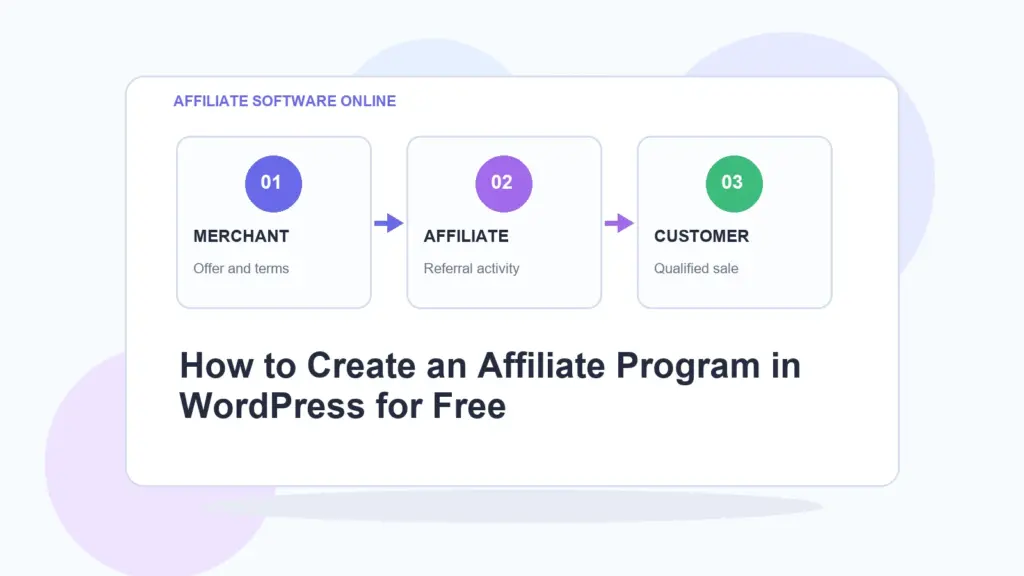
Quick answer: To create an affiliate program in WordPress for free, install a WordPress affiliate plugin, create affiliate records, assign each affiliate a referral code, generate referral links, set a cookie duration, track referral visits, and record commissions when a referred visitor completes a qualifying action.
The simplest free WordPress affiliate program setup
- Install a free WordPress affiliate plugin.
- Create affiliates manually.
- Give each affiliate a unique referral link.
- Create branded campaign links if needed.
- Track clicks and referral visits.
- Record commissions only when a real conversion happens.
- Export referral and commission data for review.
Written by Elizabeth Sramek.
My opinion: most new affiliate programs do not fail because they lack advanced automation. They fail because nobody defines the basics clearly. Who is the affiliate? What link should they use? What counts as a valid referral? When is a commission recorded? If you can answer those questions, you can start lean and avoid building a tiny affiliate empire with the complexity of airport security.
What is a WordPress affiliate program?
A WordPress affiliate program is a partner or referral system run from a WordPress website. Affiliates promote your offer using unique referral links. When someone clicks an affiliate link, the site records the referral. If the visitor later completes a qualifying action, such as a purchase, signup, booking, lead form, or paid consultation, the affiliate can be credited with a commission.
A simple WordPress affiliate program usually includes:
- Affiliate records
- Unique referral codes
- Referral links
- Tracking cookies
- Click tracking
- Referral visit tracking
- Commission records
- Exportable reports
- Basic affiliate terms
You do not need a full SaaS affiliate platform to test the idea. If your program is small, controlled, and WordPress-based, a lightweight affiliate plugin can be enough.
Can you create an affiliate program in WordPress for free?
Yes, you can create an affiliate program in WordPress for free if you use a free affiliate tracking plugin and keep the first version of the program simple. The free setup should focus on the core job: creating affiliates, giving them referral links, tracking referral activity, and recording commissions.
The mistake is trying to copy a mature affiliate network on day one. You probably do not need public affiliate registration, automatic payouts, multi-tier commission logic, complex fraud scoring, ecommerce automation, custom dashboards, and twenty reports before you even know whether partners will send useful traffic.
Start with the minimum viable affiliate program:
- A few trusted affiliates
- Clear referral links
- Simple tracking
- Manual commission review
- Basic reporting
- Clear rules
That is enough to prove whether the channel has legs.
Best free tool for a simple WordPress affiliate program
Affiliate Software Online is a free WordPress affiliate marketing plugin built for site owners who want practical referral tracking without complicated setup, paid feature gates, or risky site-wide behavior.
It lets you create affiliates, give each affiliate a unique referral link, shorten campaign URLs, track clicks and referral visits, and record commissions directly inside WordPress.
That makes it useful for bloggers, creators, service businesses, consultants, small ecommerce-adjacent websites, digital product sellers, membership sites, and anyone testing partner referrals without paying for a larger affiliate platform upfront.
How to create an affiliate program in WordPress for free
Here is the practical step-by-step setup.
1. Decide what affiliates should promote
Before installing anything, decide what your affiliates will actually promote. This can be your homepage, a product page, a service page, a consultation page, a booking form, a course page, a membership signup page, or a landing page.
Do not send affiliates to random pages and hope the universe sorts it out. Pick one or two clear destinations first.
Good starting pages include:
- A product landing page
- A service booking page
- A consultation request page
- A course signup page
- A membership page
- A newsletter or lead magnet page
- A special partner offer page
The page should explain the offer clearly. If the landing page is weak, no affiliate plugin will save it. Tracking cannot rescue confusion. It can only measure it.
2. Install a WordPress affiliate plugin
Next, install a WordPress affiliate plugin that can create affiliates, generate referral URLs, track clicks, track referral visits, and record commissions.
For a lightweight free setup, Affiliate Software Online gives you the core pieces directly inside WordPress:
- Affiliate management
- Unique referral codes
- Referral URL generation
- Branded short links
- Click tracking
- Referral visit tracking
- Unique visitor tracking
- Pending commission recording
- Manual commission creation
- CSV exports
This is enough for a controlled beginner affiliate program. You can always move to a larger system later if the program grows into something more demanding.
3. Create affiliate records
Create one affiliate record for each partner. Each affiliate should have a unique referral code. The referral code is what connects visits and activity to the correct partner.
Example affiliate:
Affiliate name: Anna
Referral code: anna
Commission rate: 20%
Keep referral codes short, readable, and easy to identify. Avoid messy codes that look like temporary passwords from a cursed printer.
4. Generate referral links
After creating an affiliate, generate a referral URL for that affiliate. A basic referral link may look like this:
https://example.com/?aso_ref=annaWhen someone clicks this link, the site can recognize that Anna sent the visitor.
This is the core of affiliate tracking. Each affiliate gets a unique link. Each link identifies the source. Each referred visit can then be connected to the right affiliate.
If you need a deeper explanation of this part, the related foundation article is What Is Affiliate Tracking?.
5. Create branded short links for campaigns
Referral URLs work, but they are not always pretty. For campaigns, branded short links are often cleaner.
Example branded short link:
https://example.com/go/summer-sale/This is easier to share in emails, social profiles, YouTube descriptions, podcasts, PDFs, partner resources, and blog posts.
With Affiliate Software Online, short links can use a configurable prefix, such as /go/. This keeps short-link behavior predictable. That matters because public redirect systems can become messy or risky if they are too open.
6. Set your referral cookie duration
A referral cookie helps your site remember which affiliate referred a visitor. If someone clicks an affiliate link today and converts later, the cookie can help connect that later conversion to the original referral.
Common cookie durations include:
| Cookie duration | Best for | Comment |
|---|---|---|
| 7 days | Simple, fast decisions | Strict but clean. |
| 30 days | Most small affiliate programs | A practical default. |
| 60–90 days | Services, consulting, higher-priced offers | Better when buyers take longer to decide. |
My personal preference for most small WordPress affiliate programs is 30 days. It is long enough to be fair, but not so long that attribution becomes vague ancient history.
7. Decide what counts as a conversion
This is the step people love to skip. Do not skip it.
A conversion is the action that makes an affiliate eligible for commission. Depending on your business, that could be:
- A paid order
- A qualified lead
- A consultation booking
- A paid membership signup
- A course purchase
- A digital product purchase
- A verified form submission
- A manual approval after reviewing the referral
Clicks are not conversions. Visits are not commissions. A visitor looking around your site for twelve seconds is not a business miracle. Define the action that actually matters.
8. Record commissions deliberately
Affiliate Software Online allows commissions to be recorded manually, through a shortcode, or through a developer helper function for custom integrations.
Example conversion shortcode:
[aso_conversion amount="100" reference="order-123"]This records a pending commission when a valid referral cookie exists. The amount identifies the commissionable value, and the reference helps connect the commission to an order, booking, lead, form submission, or internal record.
I like this controlled approach for new affiliate programs. Automatic commission creation can be useful later, but in the early phase, manual or deliberate commission recording helps you avoid paying for junk leads, mistakes, duplicate records, or accidental conversions.
9. Give affiliates access to their referral information
Affiliates need to know their referral URL and basic stats. Affiliate Software Online includes a shortcode for a logged-in affiliate area:
[aso_affiliate_area]This can show logged-in affiliates their referral URL, assigned short links, click count, referral count, and tracked commissions.
You can also output the current affiliate’s referral link with:
[aso_referral_url]This keeps the affiliate experience simple. They do not need an overdesigned dashboard to start promoting. They need their link, their stats, and rules that make sense.
10. Export and review your data
Once referrals and commissions start coming in, export your data regularly. Affiliate Software Online lets you export referral and commission data as CSV files.
CSV exports are useful for:
- Commission review
- Payout planning
- Spreadsheet analysis
- Monthly affiliate reports
- Backup records
- Checking which partners send useful traffic
You do not need advanced reporting at the start. You need enough data to answer: who sent traffic, what happened, and should anyone be paid?
Free WordPress affiliate program setup checklist
Use this checklist before inviting affiliates:
- Choose the product, service, or page affiliates will promote.
- Install your WordPress affiliate plugin.
- Create affiliate records.
- Assign unique referral codes.
- Generate referral links.
- Create branded short links for important campaigns.
- Set your referral cookie duration.
- Define what counts as a valid conversion.
- Decide whether commissions are manual, shortcode-based, or custom-integrated.
- Create a basic affiliate terms page.
- Give affiliates access to their referral URL.
- Export referral and commission data regularly.
WordPress affiliate program example
Let’s say you sell a digital product for $100 and want to pay affiliates 20% commission.
| Item | Example |
|---|---|
| Product price | $100 |
| Affiliate commission | 20% |
| Commission amount | $20 |
| Referral cookie | 30 days |
| Affiliate link | https://example.com/?aso_ref=anna |
| Campaign short link | https://example.com/go/anna-guide/ |
If Anna sends a visitor through her referral link and that visitor buys the product within the cookie window, you can record a pending commission for Anna.
The important word is pending. In my view, new affiliate programs should review commissions before approval. It is cleaner, safer, and less likely to create awkward “why did the robot pay this person?” moments.
Free plugin vs paid affiliate platform
A free WordPress affiliate plugin and a full affiliate platform are not the same thing. Both can be useful, but they serve different stages.
| Option | Best for | Limitations |
|---|---|---|
| Free WordPress affiliate plugin | Small programs, bloggers, creators, consultants, service businesses, early-stage testing. | Usually less automation and fewer enterprise features. |
| Paid affiliate plugin | Growing WordPress stores that need deeper ecommerce integrations. | Can become expensive or feature-gated. |
| Full affiliate platform | Larger partner programs, SaaS, iGaming, networks, multi-brand operations, advanced reporting. | More setup, higher cost, more operational complexity. |
Start with the level of software that matches the size of the program. Buying enterprise affiliate software before you have affiliates is like buying a forklift to move one notebook. Technically impressive. Spiritually unnecessary.
When Affiliate Software Online is a good fit
Affiliate Software Online is a good fit if you want to run a simple affiliate program inside WordPress without paying for a larger system upfront.
It is especially useful for:
- Bloggers with partner referrals
- Creators selling digital products
- Coaches and consultants
- Service businesses
- Membership sites
- Small ecommerce-adjacent websites
- Newsletter owners tracking partner links
- Businesses testing affiliate marketing for the first time
The plugin is strongest when you want practical tracking and control. It is not trying to be a giant affiliate network. That restraint is the appeal.
When you should not use a lightweight WordPress affiliate plugin
A lightweight plugin is not the right tool for every business. You should consider a more complete affiliate system if you need:
- Large-scale automated affiliate onboarding
- Advanced fraud detection
- Multi-level commission structures
- Automated billing and invoicing
- Deep ecommerce automation
- Multi-brand partner management
- Complex reporting for affiliate managers
- High-volume performance marketing operations
For those cases, a complete affiliate ecosystem such as Scaleo makes more sense. A free WordPress plugin is ideal for starting lean. A full affiliate platform is ideal when the affiliate channel becomes serious infrastructure.
Common mistakes when creating an affiliate program in WordPress
1. Starting with too many affiliates
Start with a small group of trusted partners. Five good affiliates are better than fifty random signups who never send useful traffic.
2. Not defining commission rules
Affiliates need to know what counts as a valid commission. Is it a paid order? A qualified lead? A booked call? A subscription? Define it before launching.
3. Sending affiliates to weak pages
If the landing page is unclear, affiliates will send traffic into fog. Build one good page before creating ten campaign links.
4. Confusing clicks with results
Clicks show interest. They do not prove revenue. Track clicks, but pay commissions based on defined outcomes.
5. Automating before understanding
Automation is useful once your process is stable. Early on, manual review gives you better control and teaches you what your affiliate program actually needs.
Final verdict: start lean, track clearly, add complexity later
You can create an affiliate program in WordPress for free by using a lightweight plugin, creating affiliate records, generating referral links, tracking clicks and referral visits, and recording commissions when real conversion events happen.
The smart beginner setup is not complicated. It is clear. One affiliate, one referral code, one trackable link, one defined conversion rule, one commission record.
Affiliate Software Online is built for exactly that stage: site owners who want practical affiliate tracking inside WordPress without paying for a heavy platform before the program proves itself.
My view: do not overbuild your affiliate program on day one. Build a clean little machine first. If it starts making money, then you can make it fancier.
FAQ: creating an affiliate program in WordPress
Can I create an affiliate program in WordPress for free?
Yes. You can create a free WordPress affiliate program by using a free affiliate plugin, creating affiliate records, generating referral links, tracking referral activity, and recording commissions manually or through controlled conversion tracking.
What is the easiest way to start an affiliate program in WordPress?
The easiest way is to start with a lightweight affiliate plugin, manually add a few trusted affiliates, give each partner a referral link, define your commission rule, and review commissions before approval.
Do I need WooCommerce to run an affiliate program?
No. You can run a simple affiliate or referral program without WooCommerce if your plugin allows referral tracking and commission recording through manual entries, shortcodes, or custom integrations.
What should affiliates promote first?
Affiliates should promote one clear landing page, product page, service page, booking page, signup page, or lead form. Sending affiliates to too many pages at the start makes tracking and optimization harder.
Should commissions be automatic or manual?
For new affiliate programs, manual or pending commission review is often safer. Automatic commissions can be useful later, but early programs usually benefit from more control while rules are still being tested.